LIVE FLOOR PLAN
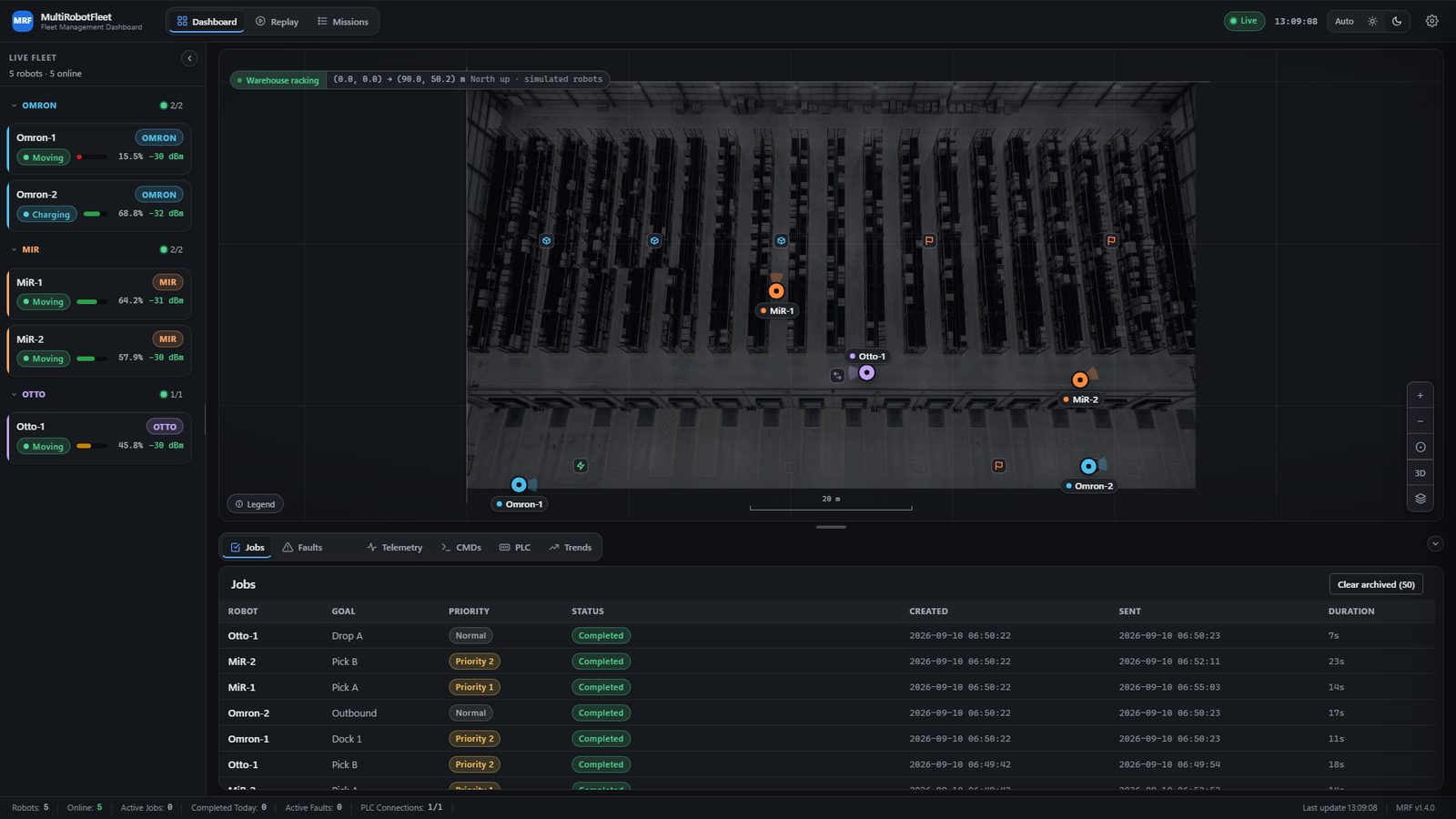
Every robot on your own plant map, moving in real time, with its state and its current mission on its card.
MRF, THE MULTIROBOTFLEET // BY KOVA TECH INDUSTRIES
Mixed fleets are the reality: an Omron here, two MiRs there, an Otto on the dock, and every vendor ships its own island of software. MRF puts them on one live floor plan, one job queue and one fault list, then connects the result straight into the automation stack you already run.
THE WALKTHROUGH
WHAT IT REPLACES
| Today | With MRF |
|---|---|
| TodayOne vendor app per robot brand. | With MRFOne dashboard for Omron, MiR and Otto. |
| TodayRadio calls asking whether it is moving. | With MRFEvery robot's live position on one floor plan. |
| TodayA fault noticed when somebody walks past. | With MRFA fault raised, badged and logged the second it happens. |
| TodayPLC data locked in the panel. | With MRFLive tags in the browser, and in your SCADA on the Plant tier. |
| TodayCustom middleware for every new system. | With MRFA REST API and MQTT in the product, and an OPC UA server on the Plant tier. |
CAPABILITIES
MRF is licensed per named site in two tiers, Floor and Plant. Everything on this list is in both of them.
Every robot on your own plant map, moving in real time, with its state and its current mission on its card.
One queue for the whole fleet, with priorities. Mark a job urgent and it jumps ahead of the normal work.
A fault is raised, badged and logged the second the robot reports it, not when somebody walks past it.
Battery, signal and speed per robot, on the same screen as the map and the queue.
Tag values off the line in the browser, and setpoints you can write back. Every tag carries its own writable flag and the server validates the write, so a safety tag cannot be written from the dashboard.
Throughput, job duration, utilization, faults and battery over the last hour, shift or day, exported as CSV. The seven day window is on the Plant tier.
Import the map you already have: Omron MobilePlanner, SEER .smap, ROS map_server files, MiR maps and positions pulled over the MiR REST API, or any floor plan image with a two point scale. Whatever the map declares renders on the floor plan: walls, goals, docks and forbidden areas from a MobilePlanner or SEER file, the floor image and its walls from a ROS or MiR map. Goal names and MiR positions become dispatch destinations; on an image or a ROS map you place your own. OTTO sites use the floor plan image.
Your real robots are dispatched through command templates you configure for them, so each brand is spoken to the way that brand expects.
A REST API for the systems around the fleet, so MES and ERP hooks read the same data the dashboard shows.
A tablet friendly surface for calling and cancelling jobs and acknowledging faults, next to a live floor map it can watch but not change.
MRF PLANT
The Plant tier adds the automation stack surface: a hosted OPC UA server your SCADA connects to, the seven day trend window, and extended history retention so job history and faults are kept longer. Everything else ships in both site tiers.
Both tiers are licensed per named site, and priced per site on quote.
ADD-ONS
The Flight Recorder and the Mission Engine are sold as add-ons on either site tier.
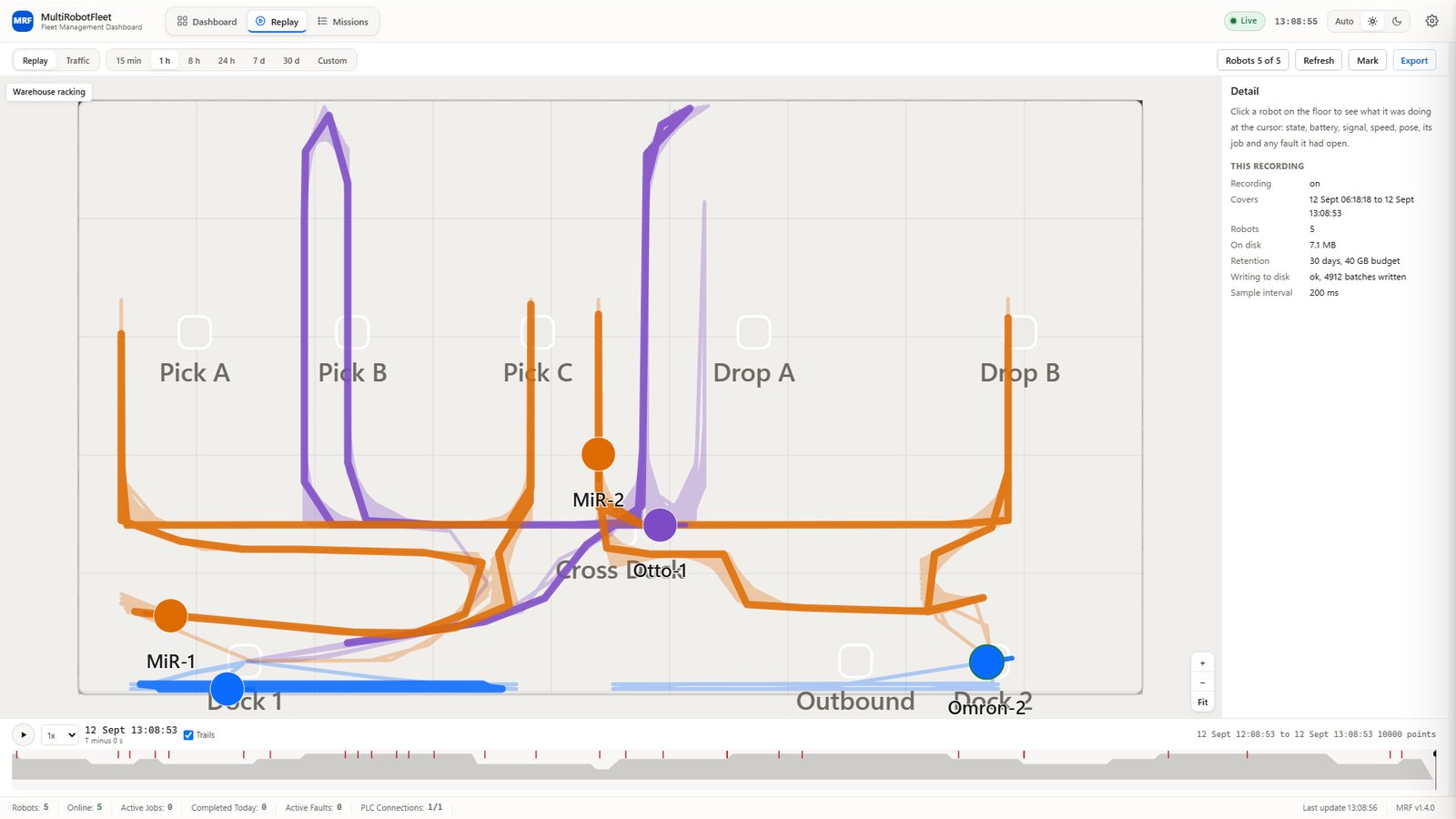
The Flight Recorder keeps what your fleet actually did: every robot's position and state, every job and every fault, held on the same PC MRF runs on and replayed on your own floor plan at any point inside the retention window. Traffic maps show you which corridors carry the work.
Replay of a simulated fleet.
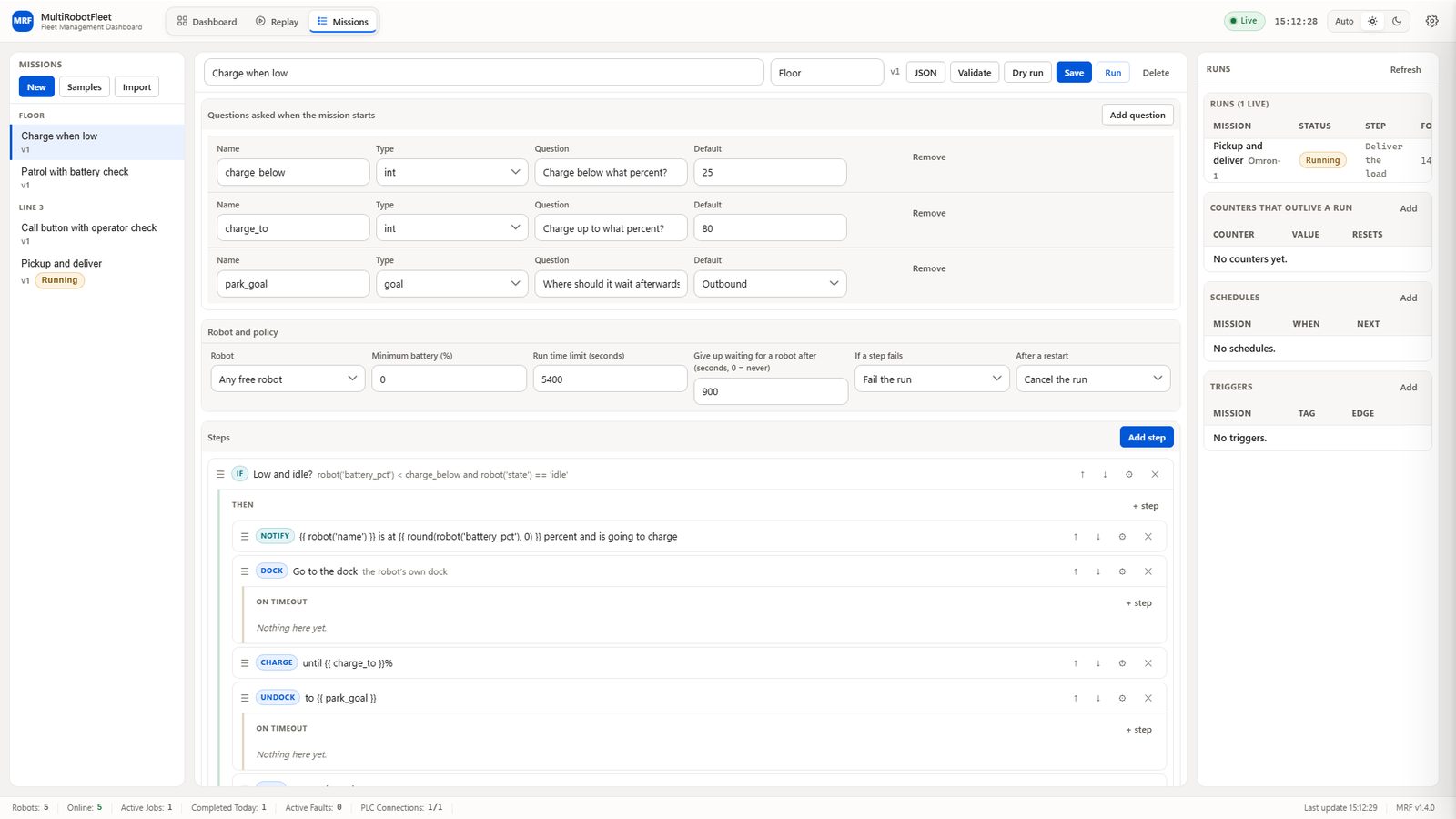
The Mission Engine turns single jobs into missions: an ordered list of steps with conditions, loops, waits, counters, timers, PLC handshakes, operator prompts and error handling. A mission starts by hand, on a schedule, or on a PLC tag, and it drives robots through the same job queue the dashboard already shows.
A sample mission open in the editor, with one run live on a simulated fleet.
IN DEVELOPMENT
The same map, the same robots and the same jobs, tilted into a navigable 3D view of your floor for control room walkthroughs. It is in development.
BUILT FOR THE PLANT FLOOR
MRF runs on one industrial PC on your own network. The dashboard is a browser tab on any machine that can reach it, with nothing to install on that machine.
Signed licence files, no phone-home and no licence server. Nothing outside your building can reach a running floor.
The API fails closed rather than open, and the credentials MRF holds for your devices are stored encrypted.
When a send does not land, the job is marked failed with the reason. Nothing is reported as sent that was not sent.
Every PLC tag carries its quality, good, bad or uncertain, so a stale value never gets read as a live one.
A reporting window with no data in it says it has no data, instead of drawing a zero line across the chart.
Simulated data is badged as simulated. The fleet in the screenshots and in the tour on this page is a simulated one.
MRF computes no cost or ROI figure, because nothing in it measures cost. It exports the measured inputs a costing model needs, and leaves the costing to you.
MRF does not author maps or zones; MobilePlanner, RoboShop and the vendor tools do that. It does not arbitrate traffic between robots; blocking zones and right of way stay in the vendor fleet managers.
MRF is not a safety instrumented system and must never be part of one. Safety functions stay in your safety rated hardware.
INTEGRATION SURFACE
Omron, MiR and Otto, over REST and MQTT.
Allen-Bradley over EtherNet/IP, Siemens S7, Omron FINS, and any OPC UA device.
A hosted OPC UA server on the Plant tier, tested in shape against Ignition, Kepware and UaExpert.
A REST API for the systems around the fleet.
THE TOUR
REQUEST A DEMO
Tell us what you run. We reply the same day with a time and what we need from you.
Book a demo and we will show it on your own floor plan.